
Apple’s Unified Logs are a crucial source of information during a forensic examination, as they allow investigators to extract detailed, timestamped data about a user’s interactions with their Apple device.
In this article, I won’t revisit the potential of these logs or the various ways to extract and analyze them. I highly recommend reading Alexis Brignoni’s article Extraction, Processing, & Querying Apple Unified Logs from an iOS Device, and Lionel Notari’s blog articles focusing on the relevant logs and how to understand them.
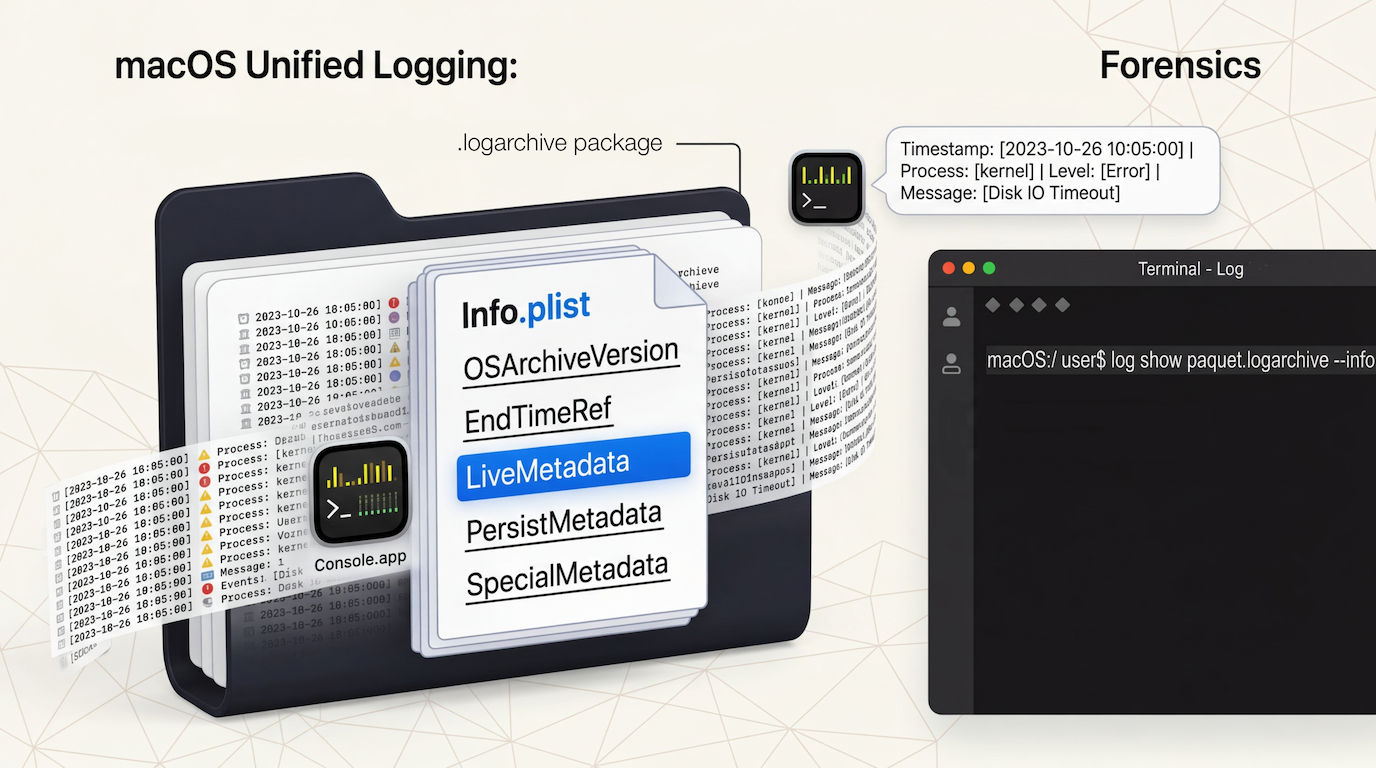
Instead, I’ll present a method for extracting Unified Logs from a Full File System acquisition of an iPhone, an iPad, or a forensic image containing a macOS operating system. This includes creating a .logarchive package and the Info.plist file, whose contents have become more complex to generate since macOS 26.4.
Creation of a .logarchive Package
Unified Logs are distributed across two directories: /private/var/db/diagnostics/ and /private/var/db/uuidtext/. To analyze them using the Console app or the log show command on macOS, their contents must be first combined into a single .logarchive package.
Important: Make sure to copy the contents of the diagnostics and uuidtext directories, not the directories themselves.
This can be done either via the Finder:
- Create a directory to hold the Unified Logs
- Copy the contents of /private/var/db/diagnostics/
- Copy the contents of /private/var/db/uuidtext/
- Add the .logarchive extension to the newly created directory.
Or by using terminal commands:
- mkdir <folder_name>.logarchive
- cp -R /private/var/db/diagnostics/<folder_name>.logarchive
- cp -R /private/var/db/uuidtext/<folder_name>.logarchive
However, in its current state, the .logarchive package that has just been generated appears to be incomplete.

To identify which elements are missing, the contents of a .logarchive package obtained using the sudo log collect command (system_logs.logarchive) are compared with those of a manually created one (unified_logs.logarchive).
In the system_logs.logarchive package, the files originally located at the root of /private/var/db/diagnostics/ (diagnosticd.x.log, logd_helper.x.log, logd.x.log, logdata.statistics.x.jsonl, logdata.statistics.x.txt, roles.plist, and shutdown.x.log) have been moved into a folder named Extra. Two new files also appear at the root of the .logarchive package: logdata.LiveData.tracev3 and Info.plist.
The files contained in the Extra folder do not seem to be used by either the Console app or the log show command. However, the Info.plist file is essential.
Creating the Info.plist File
An XML-formatted Info.plist file must be created at the root of the .logarchive package. It must include a ‘OSArchiveVersion’ key with a value between 1 and 5, depending on the OS version corresponding to the logs being analyzed.
| macOS version | iOS/iPadOS version | ‘OSArchiveVersion’ value |
|---|---|---|
| 10.12 – 10.12.5 | 10.0 – 10.2 | 2 |
| 10.12.6 – 10.13.6 | 10.3 – 11.x | 3 |
| 10.14 – 11.x | 12.x – 14.x | 4 |
| 12.x – 26.x | 15.x – 26.x | 5 |
Example of an Info.plist file:
<?xml version=”1.0″ encoding=”UTF-8″?>
<!DOCTYPE plist PUBLIC “-//Apple//DTD PLIST 1.0//EN” “http://www.apple.com/DTDs/PropertyList-1.0.dtd“>
<plist version=”1.0″>
<dict>
<key>OSArchiveVersion</key>
<integer>5</integer>
</dict>
</plist>
The plist file can be created using a basic text editor or with the following command in macOS:
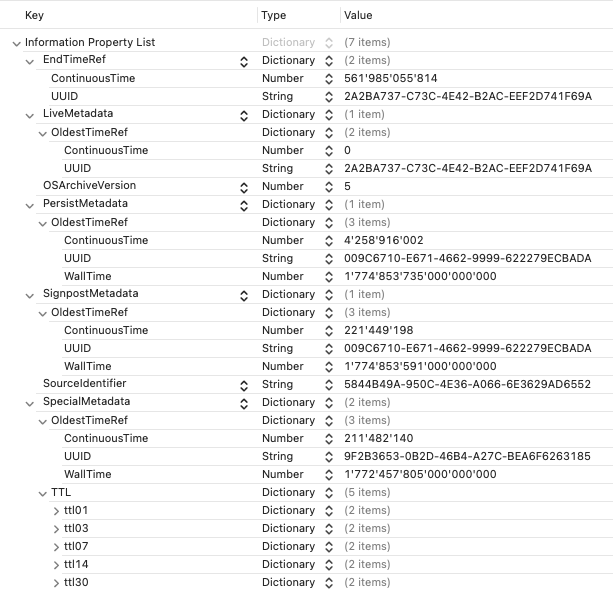
/usr/libexec/PlistBuddy -c "Add OSArchiveVersion integer 5" <foldername>.logarchive/Info.plistThis method worked up until the latest macOS update on March 24, 2026. However, starting with version 26.4, additional keys must now be included in the Info.plist file.
Contents of the Info.plist File
Methodology Used
A unified log acquisition was performed on a Mac Studio M1 Max running macOS 26.4. Two .logarchive packages were created — one (log_collect.logarchive) using the command sudo log collect, and another one (log_copy.logarchive) created manually by copying the contents of the two directories /private/var/db/diagnostics/ and /private/var/db/uuidtext/.
The Info.plist file from the log_collect.logarchive package was copied into the log_copy.logarchive package, after which the following command was executed to display the events recorded in the last minute of logs: log show --info --debug log_copy.logarchive --last 1m.
The same command was then run again after removing each key/value pair from the original Info.plist file in turn, in order to identify which ones were required.
Structure of the Original Info.plist File
The original Info.plist file contains the following keys:
<dict>
  <key>ArchiveIdentifier</key>
  <key>EndTimeRef</key>
  <dict>
    <key>ContinuousTime</key>
    <key>UUID</key>
    <key>WallTime</key>
  </dict>
  <key>HighVolumeMetadata</key>
  <dict>
    <key>OldestTimeRef</key>
    <dict>
      <key>ContinuousTime</key>
      <key>UUID</key>
      <key>WallTime</key>
    </dict>
  </dict>
  <key>HighVolumeSizeLimit</key>
  <key>LiveMetadata</key><dict>
  <dict>
    <key>OldestTimeRef</key>
    <dict>
      <key>ContinuousTime</key>
      <key>UUID</key>
      <key>WallTime</key>
    </dict>
  </dict>
  <key>OSArchiveVersion</key>
  <key>OSLoggingSupportProject</key>
  <key>OSLoggingSupportVersion</key>
  <key>PersistMetadata</key>
  <dict>
    <key>OldestTimeRef</key>
    <dict>
      <key>ContinuousTime</key>
      <key>UUID</key>
      <key>WallTime</key>
    </dict>
  </dict>
  <key>PersistSizeLimit</key>
  <key>SignpostMetadata</key>
  <dict>
    <key>OldestTimeRef</key>
    <dict>
      <key>ContinuousTime</key>
      <key>UUID</key>
      <key>WallTime</key>
    </dict>
  </dict>
  <key>SignpostSizeLimit</key>
  <key>SourceIdentifier</key>
  <key>SpecialMetadata</key>
  <dict>
    <key>OldestTimeRef</key>
    <dict>
      <key>ContinuousTime</key>
      <key>UUID</key>
      <key>WallTime</key>
    </dict>
  <key>TTL</key>
  <dict>
    <key>ttl01</key>
    <dict>
      <key>ContinuousTime</key>
      <key>UUID</key>
    </dict>
    <key>ttl03</key>
    <dict>
      <key>ContinuousTime</key>
      <key>UUID</key>
    </dict>
    <key>ttl07</key>
    <dict>
      <key>ContinuousTime</key>
      <key>UUID</key>
    </dict>
    <key>ttl14</key>
    <dict>
      <key>ContinuousTime</key>
      <key>UUID</key>
    </dict>
    <key>ttl30</key>
    <dict>
      <key>ContinuousTime</key>
      <key>UUID</key>
    </dict>
  </dict>
  <key>SpecialSizeLimit</key>
</dict>
‘HighVolumeMetadata’, ‘PersistMetadata’, ‘SignpostMetadata’, and ‘SpecialMetadata’ keys appear to correspond to the ‘HighVolume’, ‘Persist’, ‘Signpost’ and ‘Special’ subdirectories originally stored in /private/var/db/diagnostics/.
Keys to Be Included in the Created Info.plist File
In addition to ‘OSArchiveVersion’, the Info.plist file must include the following keys:
- EndTimeRef
- LiveMetadata
- PersistMetadata
- SpecialMetadata
Each of these keys contains a dictionary in which the subkeys ‘ContinuousTime’ and ‘UUID’ must both be defined.
Let’s take the example of the ‘PersistMetadata’ key to illustrate how to retrieve the data it contains.

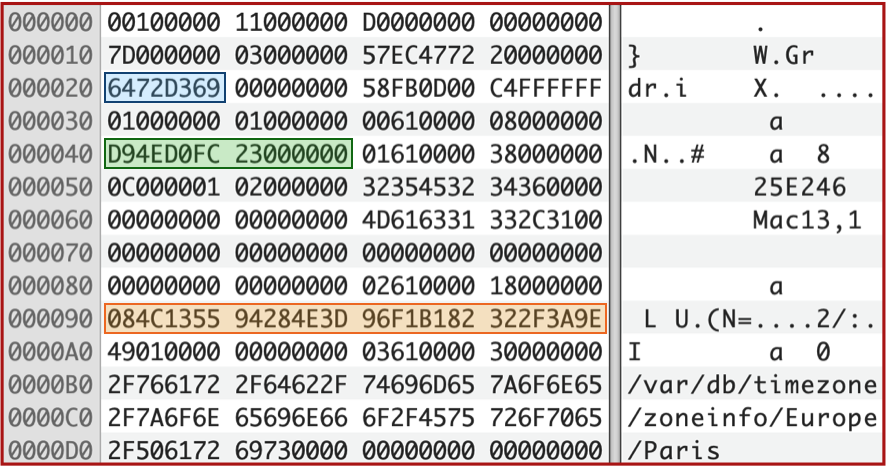
‘OldestTimeRef’ is a dictionary containing the mandatory ‘ContinuousTime’, ‘UUID’ keys, and the optional ‘WallTime’. Based on the name ‘OldestTimeRef’, the oldest .tracev3 file in the ‘Persist’ directory is opened using a hex editor.
Joachim Metz describes numerous file formats on his dtformats GitHub repository including the .tracev3 format used by unified logs (Apple Unified Logging and Activity Tracing formats).
Offset 0x20 contains a 4-byte unsigned little-endian integer representing the number of seconds elapsed since January 1, 1970, 00:00:00 UTC (UNIX Epoch), without accounting for leap seconds: 0x69D37264 → 1,775,465,060 (value stored in the Info.plist file: 1,775,465,060,864,886,083).
Offset 0x40 contains a 4-byte unsigned little-endian integer representing a Mach continuous timestamp, matching the value found in the Info.plist file: 0x23FCD04ED9 → 154,565,365,465.
Offset 0x90 contains the boot identifier (Boot UUID), stored in big-endian format.
By analyzing the oldest .tracev3 file from each of the ‘HighVolume’, ‘Persist’, ‘Signpost’, and ‘Special’ directories, it’s possible to reconstruct the values for the ‘HighVolumeMetadata’, ‘PersistMetadata’, ‘SignpostMetadata’, and ‘SpecialMetadata’ keys in the Info.plist file.
The ‘EndTimeRef’ key appears to contain information about the most recent unified log event(s). To retrieve this data, the .timesync files stored in the directory of the same name contain boot identifiers and timestamp information. Each record containing a boot identifier begins with the 0xB0BB signature.
The most recent .timesync file provides the latest boot identifier stored in the .tracev3 files.
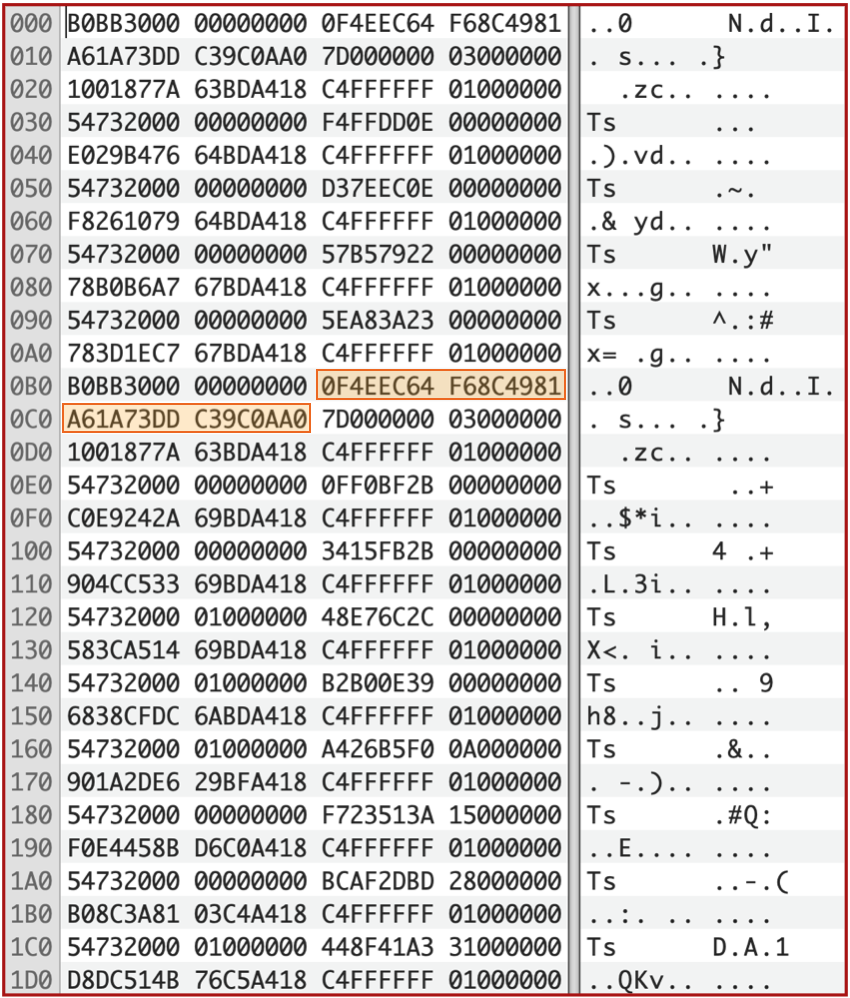
This is the UUID stored in both the ‘EndTimeRef’ and ‘LiveMetadata’ keys in the Info.plist.
To retrieve the Mach Continuous Time of the oldest event in the logs, the oldest .tracev3 file from each of the ‘HighVolume’, ‘Persist’, ‘Signpost’, and ‘Special’ directories must be analyzed. If the boot identifier matches the one found in the most recent .timesync file, the next step is to locate the final Catalog chunk, identifiable by the 0x0B60000011000000 signature.

The Catalog chunk header provides the location of the catalog sub-chunks, the number of sub-chunks it contains, and consequently the last Mach continuous timestamp.
Since the sub-chunks contain no signatures or size information, they must be individually parsed to locate the start of the next one and reach the final one:
| Offset | Size | Description |
|---|---|---|
| 0x00 | 8 | Start Mach Continuous Time |
| 0x08 | 8 | Last Mach Continuous Time |
| 0x10 | 4 | Uncompressed size of chunk |
| 0x14 | 4 | Compression algorithm used |
| 0x18 | 4 | Number of indexes or procinfos |
| 0x1C | 2 x Number of indexes or procinfos | Indexes (2 bytes each) |
| 0x1C + (num_indexes x 2) | 4 | Number of string offsets or subcats |
| — | 2 x Number of string offsets or subcats | String Offsets (2 bytes each) |
| — | — | 64-bit alignment padding |
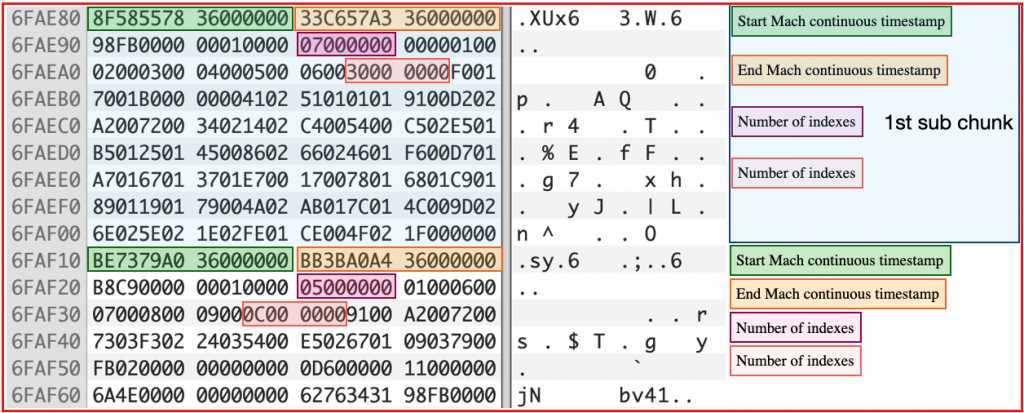
After identifying the Last Mach Continuous Time value from the most recent .tracev3 file in the ‘HighVolume’, ‘Persist’, ‘Signpost’, and ‘Special’ directories, the highest of these values must be inserted into the ‘EndTimeRef’ > ‘ContinuousTime’ key of the Info.plist file.
Finally, for the ‘LiveMetadata’ key, since the logdata.LiveData.tracev3 file is not present in a manually created .logarchive package, the ‘ContinuousTime’ value is set to 0.
Now the Info.plist file contains all the information necessary to process the .logarchive package using either the Console app or the log show command in Terminal.
Tests were conducted using unified logs obtained with the sudo log collect command, as well as from a .logarchive package generated manually from the contents of the /private/var/db/diagnostics/ and /private/var/db/uuidtext/ directories. Not only are the timestamps displayed by the log show command identical between the two .logarchive packages, but by replacing the original Info.plist file with the manually created one in logs obtained via sudo log collect command, an additional 1 to 2 seconds of logs could be recovered.
Keys That Can Be Added to the created Info.plist File
At the root of the manually generated .logarchive package, the version.plist file contains key/value pairs that can be inserted into the Info.plist file to complete it, although these are not strictly required.
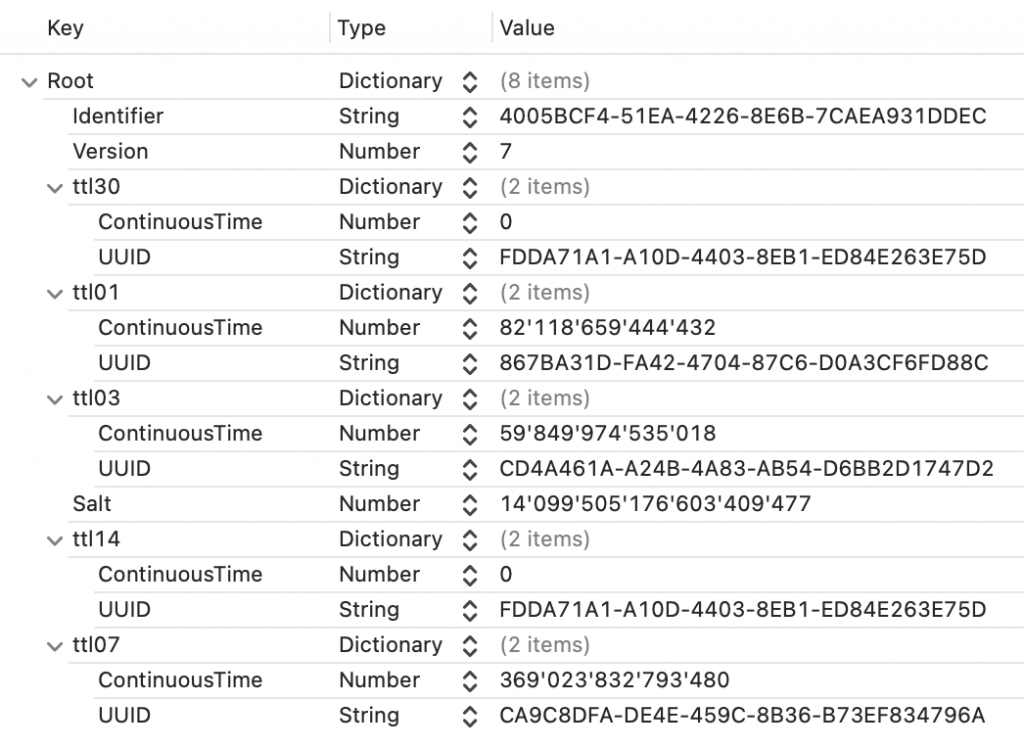
The value of the ‘Identifier’ key corresponds to the ‘SourceIdentifier’ value in the Info.plist file. The ‘ttl01’, ‘ttl03’, ‘ttl07’, ‘ttl14’, and ‘ttl30’ keys can be inserted into ‘SpecialMetadata’ > ‘TTL’.
Python Script
While the Info.plist file can be created manually without difficulty, this process is prone to errors and can become particularly time-consuming.
I have created a small Python script, logarchive_info.py, automatically generating the missing Info.plist file, enabling the use of .logarchive packages with the Console app or the log show command in Terminal on macOS—even with the latest versions (macOS 26.4 and later).
The script takes the .logarchive package location as input, analyzes the .tracev3, .timesync, and version.plist files to extract the required values, and creates the Info.plist file at the root of the .logarchive package.